Divine
- 3.5
- Rating
- 10.00K
- Installs
- Free
- Price

 Analysis by App-foxy
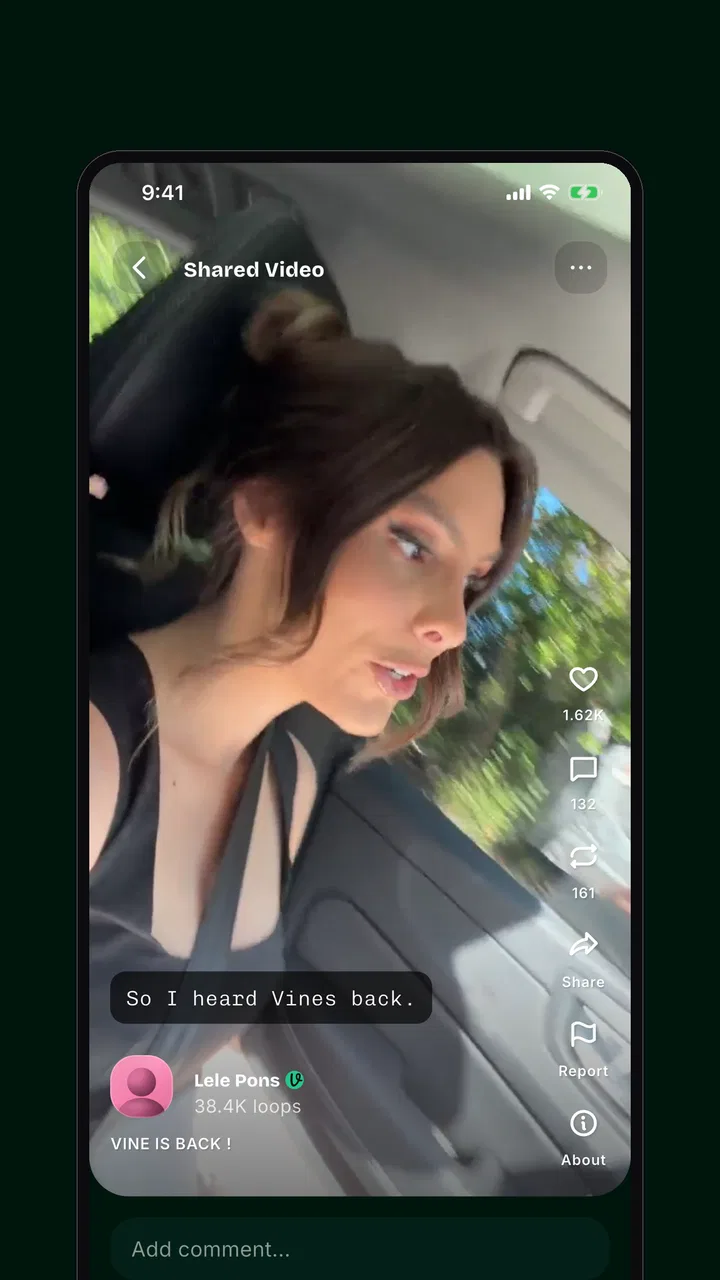
I approached Divine as a social app for people who want to share very small pieces of real life rather than polished, heavily edited posts. Its central idea is simple: short videos made by people, with each clip limited to six seconds. That restriction changes the way I think while using it. Instead of planning a complete story, I look for one expression, one movement, one surprising detail, or one quiet moment that can stand on its own.
That makes the app feel different from the usual social feeds. It is not trying to replace a full video platform, a messaging service, or a photo diary. I see it more as a quick window into other people’s moments, where the appeal comes from immediacy and brevity. The store summary presents it as a place for human-made clips, and that emphasis is important: the experience is built around discovering personal moments rather than treating a feed as a collection of polished advertisements or artificial content.
Divine is free to use and belongs to the social category. It is developed by Verse Communication PBC, and its current version is 1.0.20. The app is marked for mature users aged 17 and over, so I would not install it on a child’s device or assume that every item in the feed will suit a younger audience. On Android, it requires at least version 9 of the operating system, which keeps the technical entry point reasonably accessible for many users.
You May Also Like

 AccuWeather: Weather Radar
AccuWeather Review: A Quick, Clear Forecast for Everyday Decisions
For everyday plans, the best forecast is the one you can understand quickly. AccuWeather makes rain timing, radar, and local conditions easy to act on, with a few trade-offs.

 Hill Climb Racing
Why Hill Climb Racing Still Turns Crashes Into One More Run
A tiny car, a bumpy hill and one more upgrade: Hill Climb Racing keeps resurfacing because its simple chaos makes every near-miss feel personal.

 AliExpress - Shopping App
AliExpress Makes Global Shopping Feel Personal, but Shoppers Bear the Risk
AliExpress turns a global marketplace into a pocket-sized discovery engine. Its reach is useful, its shopping loop compelling, and its trade-offs easy to miss.

 Lords Mobile: Kingdom Wars
Lords Mobile Is a Kingdom-Building Routine, Not a Quick Match
A case-by-case verdict on the building, battles, device demands, and social commitments that make Lords Mobile rewarding for some players and exhausting for others.

 PDF Scanner app - TapScanner
TapScanner Makes Paperwork Easier to Capture, Check, and Share
TapScanner makes scanning with a phone feel less like a rescue operation and more like a dependable step in getting work done. Its capture tools are useful, though not flawless.

 Block Blast!
 Shows How Much a Puzzle Game Can Leave Out
A quiet grid game shows why puzzle players increasingly value instant clarity, repeatable skill and low-pressure play—and where the genre still needs to catch up.
More From Our News Desk
View All News


What the first session feels like
My first recommendation is to enter Divine with the right expectation: this is a place for quick discovery, not a conventional video editor. The six-second limit is the feature that gives the app its identity, but it is also the boundary that determines whether it will suit you. If you enjoy capturing a passing reaction, a street detail, a pet doing something unexpected, or a tiny visual joke, the format feels natural. If you want long explanations, tutorials, travel diaries, or carefully developed narratives, you will reach the limit very quickly.
The short format also makes the feed easier to sample. A clip can communicate its idea almost immediately, so I can move through several moments without committing to a long viewing session. That is useful when I have a spare minute, but it has a trade-off: very short videos can feel disposable when the creator has not chosen a strong central moment. The best results come from treating the limit as a creative constraint, not as a reason to squeeze a large story into a tiny space.
The app’s “humans only” positioning gives it a clear personality. I read that less as a promise that every clip will feel profound and more as a signal about the kind of community Divine wants to build. The attraction is the possibility of seeing ordinary, imperfect, personal moments. That can make the feed feel more intimate than a platform dominated by professional production, although it also means the quality and usefulness of individual posts may vary.
Its early adoption is still modest, with over ten thousand installs and an average rating of 3.5 from around two hundred ratings. I would interpret that as a reason to approach Divine with curiosity rather than expecting the depth of a mature social network. A smaller community can feel less overwhelming, but it may also mean that the amount of content and the pace of discovery depend heavily on how actively people are posting.
Who is likely to enjoy it
I think Divine is a good match for someone who likes visual check-ins and spontaneous sharing. It can work for a person who wants to post a quick moment without writing a caption-heavy update, for a creator experimenting with concise storytelling, or for a viewer who prefers a stream of tiny observations to long videos. It may also appeal to people tired of feeds where every post looks staged and commercially produced.
The app is less suitable for anyone who needs a dependable place for detailed communication. A six-second clip cannot replace a proper explanation, a group conversation, a long-form video, or a private message with context. If your main goal is to teach, document an event, compare products, or maintain a close circle of friends, a more established social or video service will probably be more practical.
I would also skip it if you dislike public-facing experimentation. The format encourages quick posts, but that does not mean every post will automatically feel comfortable to share. Before recording, I find it useful to ask what the single point of the clip is. If I cannot answer that in a sentence, the moment probably needs a different format or should remain private.
Getting started without overthinking the setup
For a first-time user, the most reassuring approach is to keep the initial session small. Install Divine on a compatible device, open it, and spend time observing the feed before trying to create something ambitious. The goal is not to understand every possible social habit immediately. It is to learn the rhythm of the six-second format and decide whether the kind of content appearing there matches what you want from a social app.
I would begin by watching several clips all the way through rather than judging the service from the first item. Notice how often a video communicates through a face, a sound, a movement, or a visual surprise. This gives you a practical sense of what works in the format. It also helps answer an important question before you post: do you want to participate as a creator, a viewer, or both?
When you are ready to record, prepare the moment before opening the camera. A short clip leaves little room for searching around, correcting the framing, or explaining what happened afterward. I get better results when I choose the subject first, hold the phone steady, and decide where the action should begin. That preparation is more valuable here than trying to add complicated production techniques.
A useful beginner exercise is to record three different types of six-second material without publishing immediately: a reaction, a moving subject, and a quiet detail. The reaction tests timing, the moving subject tests framing, and the detail tests whether a small visual idea can carry the entire clip. Reviewing those attempts helps you discover which style feels natural without turning the first post into a performance.
Because the app is rated Mature 17+, I would also treat the first setup as a chance to establish sensible personal boundaries. Think about what appears in the background, whether other people are identifiable, and whether a location reveals more than you intend. The short length does not remove the need for judgment. A fast post can still expose a private setting or someone who did not agree to be recorded.
Your first meaningful post
The easiest path to a satisfying first result is to capture an event that already has a clear beginning and end. Imagine a friend opening a birthday card, a dog noticing a harmless sound, steam rising from a morning drink, or a street performer making one distinct gesture. These situations do not require a long explanation. The viewer can understand the point through the image itself.
For an everyday scenario, picture finishing work and noticing dramatic light moving across the wall at home. Rather than recording a long room tour, I would frame the changing light and let the movement provide the story. Another example is cooking: instead of documenting the entire recipe, I might capture the moment a topping lands on the finished dish. The limitation encourages me to choose the part people would actually want to see.
Timing matters more than technical polish. Start recording just before the meaningful action, not several seconds earlier, and avoid ending immediately before the payoff. If the moment is unpredictable, it is better to simplify the composition than to chase it with the phone. A stable, understandable clip usually works better than a technically ambitious recording in which the subject disappears from view.
Sound can also change the result, but I would not depend on it. A clip should remain understandable even if someone watches it quietly. Strong movement, contrast, expression, or a recognizable action gives the video a visual anchor. This is one of the most useful trade-offs in Divine: the format rewards a moment that can be understood quickly, while subtle stories that need dialogue may lose their impact.
After posting, resist the urge to judge the whole app by the immediate response. A small social network can take time to develop its own patterns, and a good clip may not receive instant attention. I would focus first on whether the post communicates what I intended. That is a better measure of success than trying to imitate whatever happens to be popular in the feed.
Where new users may get confused
The biggest possible misunderstanding is assuming that Divine is simply a smaller version of a standard video platform. Its short format is not just a technical limit; it changes what belongs there. A long-form creator may feel restricted, while someone who enjoys visual fragments may find the same restriction freeing. Before deciding that the app lacks depth, I would ask whether I am using it for the kind of moment it is designed to showcase.
Another source of friction is the difference between authenticity and randomness. Human-made content can feel more personal, but it will not guarantee that every clip is interesting, clear, or relevant to you. The feed may require patience. I would treat discovery as part of the experience rather than expecting every swipe to deliver a memorable post. This is also where Divine differs from a heavily optimized mainstream feed, which may be better at predicting familiar interests but can feel more commercial and repetitive.
The six-second boundary can create a temptation to rush. When a clip feels incomplete, the answer is not always to add more action. Often the better solution is to remove the setup and keep only the strongest moment. For example, if I want to share a funny reaction, I would capture the expression rather than the entire conversation that caused it. If context is essential, Divine may simply not be the right place for that story.
Privacy is another area where I would slow down. Social video makes backgrounds important, and a casual recording can include faces, screens, documents, addresses, or private conversations. I would check the edges of the frame before posting and avoid assuming that a brief clip is harmless because it disappears quickly from attention. This is a practical habit that matters more than any recording trick.
Some people may also wonder whether the app is appropriate for a private group. I would not treat its public social design as a substitute for a controlled chat unless the available sharing options clearly meet that need in your own use. For family updates or sensitive conversations, a familiar messaging service is usually the safer and more direct choice. Divine makes more sense when the point is to discover and share moments within its broader social environment.
The mature age label should influence expectations as well. It signals that the service is intended for adults, so parents should not install it for younger children simply because the videos are short. I would also recommend that new users approach the feed with the same care they use on any open social platform: avoid oversharing, review what is visible, and remember that a casual post can travel beyond the audience you imagined.
How it compares with familiar alternatives
Compared with long-form video services, Divine is quicker to create and quicker to watch. I do not need a full script, a polished introduction, or a substantial editing session to make something that fits. The cost of that convenience is expressive range. A conventional video platform is better when the viewer needs instruction, background, chapters, or a sustained argument.
Compared with image-first social apps, Divine gives movement and timing a more important role. A still photograph can preserve a composition beautifully, but a six-second video can show a gesture, a reaction, or a change that a single frame cannot. On the other hand, a photo is often easier to inspect carefully and may be better for portfolios, design work, or visual details that do not need motion.
Compared with short-video networks built around trends and recommendation systems, Divine’s human-centered identity is its most distinctive angle. I appreciate the possibility of a less manufactured atmosphere, but established alternatives may offer broader communities, more mature discovery tools, and a larger range of creator formats. I would choose Divine for its focused mood, not because it already replaces every feature offered by larger competitors.
Compared with private messaging, Divine is more about participation in a shared social space than sending a personal update to a known recipient. Messaging is preferable when context, privacy, or direct conversation matters. Divine is preferable when the clip itself is the message and you want the act of browsing other people’s moments to be part of the experience.
Making the most of the short format
Once the first post is out of the way, I would develop a repeatable workflow instead of recording whenever the app happens to be open. Keep a mental list of moments that naturally fit the format: a transformation, a reveal, a reaction, a repeating movement, or a small visual contrast. This turns the six-second limit into a filter for ideas. It also reduces the pressure to invent something on demand.
One advanced but simple technique is to plan the ending first. If the final image is strong, work backward and decide what the viewer needs to see immediately before it. This is especially useful for a reveal, a before-and-after moment, or a reaction. It prevents the common beginner mistake of spending most of the clip on setup and leaving no time for the part that makes the post worth watching.
Another useful habit is to record from the viewer’s position rather than the creator’s position. I may know why a moment is funny or beautiful, but someone scrolling through the feed does not have that private context. Before posting, I ask whether a stranger can identify the subject and understand the action without a caption. If not, I either simplify the shot or choose another platform where explanation is possible.
For people who want to build a recognizable style, consistency does not require elaborate branding. It can come from repeatedly noticing a certain kind of moment: small acts of kindness, unusual textures, local street scenes, expressive reactions, or everyday transitions. The benefit of Divine’s narrow format is that a creator can explore one visual idea repeatedly without needing to produce long episodes.
I would still avoid turning every ordinary action into content. Authenticity works best when the moment is worth sharing on its own. Posting too frequently without a clear reason can make the experience feel like a chore for both creator and viewer. A smaller number of clips with a visible point is more satisfying than filling the feed simply because the recording limit is easy to meet.
What I would check before staying
After using Divine for a while, I would evaluate it through three practical questions. First, do I enjoy the kind of moments that appear in the feed? Second, can I think of things I genuinely want to share in six seconds? Third, does the social environment feel comfortable enough for the way I use public apps? The answers matter more than the novelty of the concept.
The app’s free price makes trying it straightforward, but free access does not automatically make it the best tool for every purpose. If I need a large audience, reliable private communication, advanced editing, or detailed content, I would use a more established alternative alongside it. Divine earns its place when its focused format makes me notice and share moments I would otherwise overlook.
Its current rating of 3.5, based on around two hundred ratings, suggests a mixed early reception rather than universal agreement. I do not see that as a reason to dismiss the idea, but I would keep expectations realistic while the community develops. The experience may depend strongly on the people you encounter and the kind of content you choose to follow or create.
For a first-time user, my practical advice is to watch before posting, record one clearly understandable moment, and judge the result by its communication rather than by its polish. Keep the camera steady, protect other people’s privacy, and do not force a long story into a tiny frame. Those steps make the first meaningful interaction much less intimidating.
My final view is that Divine has a clear creative identity, and I like that it asks users to pay attention to small human moments. It is not a universal social replacement, nor should it be treated as one. Its real strength is the disciplined six-second format paired with a human-focused feed. If you enjoy concise visual expression and casual discovery, it is worth exploring. If you need depth, privacy, or a large established audience, another service will probably serve you better.
FAQs for Divine
01What is Divine, and what can I use it for?
Divine is an app designed to provide users with a focused digital experience, although its exact tools and purpose may vary depending on the version available for Android or iOS. Before downloading, review the official store description carefully to confirm whether it matches your expectations. Check the listed features, supported devices, required permissions, and any account or subscription requirements so you know what the app offers before installing it.
02Is Divine free to download and use?
Divine may be available as a free download, but some features can require in-app purchases, a subscription, or a premium upgrade. The free version may also include advertising or limitations on access to certain content and tools. I recommend checking the current pricing information in Google Play or the App Store before downloading, since costs, trial periods, and subscription conditions can change between regions and app updates.
03Is Divine safe and suitable for my device?
Before installing Divine, verify that you are downloading it from the official Google Play Store or Apple App Store and that the developer information matches the legitimate publisher. Also review recent user feedback, the privacy policy, age rating, and requested permissions. Compatibility depends on your Android or iOS version, available storage, and device model, so checking the technical requirements can help prevent installation or performance problems.
04Does Divine require an account or an internet connection?
Depending on the features you want to use, Divine may require registration, login access, or an active internet connection. Online access can be necessary for synchronizing information, loading content, receiving updates, or using cloud-based functions. Some parts of the app may work offline, but this should not be assumed. Read the app description and privacy information to understand what data may be collected during account creation and regular use.
05What should I know about privacy, permissions, and subscriptions in Divine?
Before proceeding with the download, review Divine’s privacy policy and the permissions requested during installation. Pay attention to access involving your location, contacts, camera, microphone, files, or notifications, and only allow permissions that seem necessary for the features you intend to use. If the app offers a subscription, check renewal terms, cancellation instructions, and refund policies carefully to avoid unexpected charges after a trial period ends.
Pros
- Simple interface makes daily use easy for newcomers.
- Offers a focused spiritual experience without distracting features.
- Suitable for quiet personal reflection at home or on the go.
- Lightweight design should work well on many Android and iOS devices.
- Can help users build a consistent devotional routine.
Cons
- Content may feel too limited for users seeking broader spiritual resources.
- Some features may require an internet connection to work properly.
- The experience may not suit users from different faith traditions.
- Limited customization could make repeated use feel less personal.
- Updates and long-term support may vary depending on the developer.

Divine
Gallery